Film Positives
For screenprinting you need to print a film positive that is opaque enough to block out light while exposing.
Supplies
- Canon Pixma ix6820 - 13” wide, commonly recommended for this specific task
- AccuInk - UV black
Print Settings
It takes a very specific combination of settings to get the darkest opacity.
Connect with USB
You can only adjust these settings through the Canon driver, not Airprint
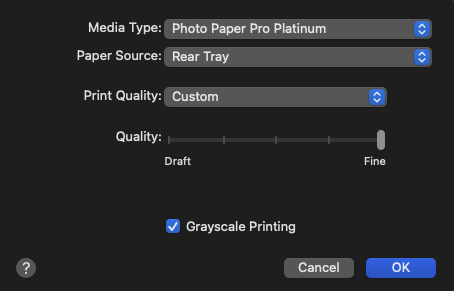
- Media Type Photo Paper Pro Platinum
- Print Quality Custom
- Quality Fine
- Grayscale Check
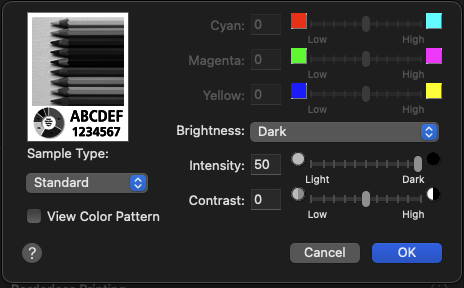
- Color Settings
- Brightness Dark
- Intensity 50
I’m still not super happy with the opacity, I think the third-party blacks vary a lot. There is black ink formulated for this purpose, need to look into it.